

Accounting
Invoices and payments
An invoice starts as a draft you can change. Issuing it gives it a number and freezes it; from then on payments and credit notes move its balance.
Invoices are on both plans. Admin, Scheduler and Bookkeeping can see them; Admin and Bookkeeping make, issue and void invoices and record payments.
- DraftAdmin or Bookkeeping drafts it from a trip, a quote or a blank page. It can still change.
- DueIssue gives it the next number, freezes it and emails the client.
- Part paid or OverdueRecorded payments and credit notes lower the balance. Past its due date with money owed, it shows Overdue.
- PaidThe balance reaches nothing. If credit notes did that instead of payments, it shows Credited.
Bill a trip
On the trip's Billing card, click Bill This Trip. What it offers depends on the trip's billing basis:
| Billing basis | What the draft bills |
|---|---|
| Charter | From the Accepted Quote: the quote's lines as they are. From What Was Flown: the rate card applied to the flight log's times, with a warning for any leg not logged yet, which bills at its scheduled times. Both, when a quote was accepted and legs are logged. |
| Cost sharing | What the trip cost, from the aircraft's costs. |
| Time-share | The billable receipts the time-share rules allow, with fuel receipts billed as a fuel charge. |
| Other | The trip's billable receipts. An accepted quote on an Other trip is billed with Bill This Quote. |
| Own use | Nothing. |
Every draft from a trip also picks up the trip's billable receipt lines that no other invoice bills. You can also click Bill This Quote on an accepted quote before the flight, or New Invoice on the Invoices tab for a blank draft for any client.
Check and issue the draft
- Open the draft. Read any warnings at the top, such as a missing segment fee.
- Use Add Line for anything extra, or Rebuild from the Trip if the trip changed. Edit Details sets the due date and the message to the client.
- Click Issue. Leave Issue date empty for today; it can go back up to 30 days, never forward. Leave Due date empty to use the draft's due date, or else the quote's or the client's payment terms.
- Click Issue Invoice. It gets the next number and can't be edited after.
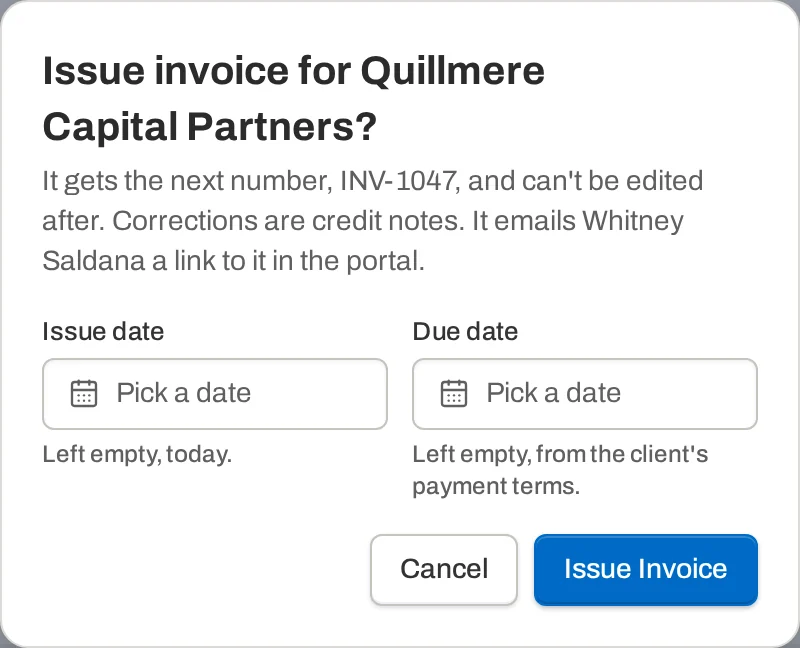
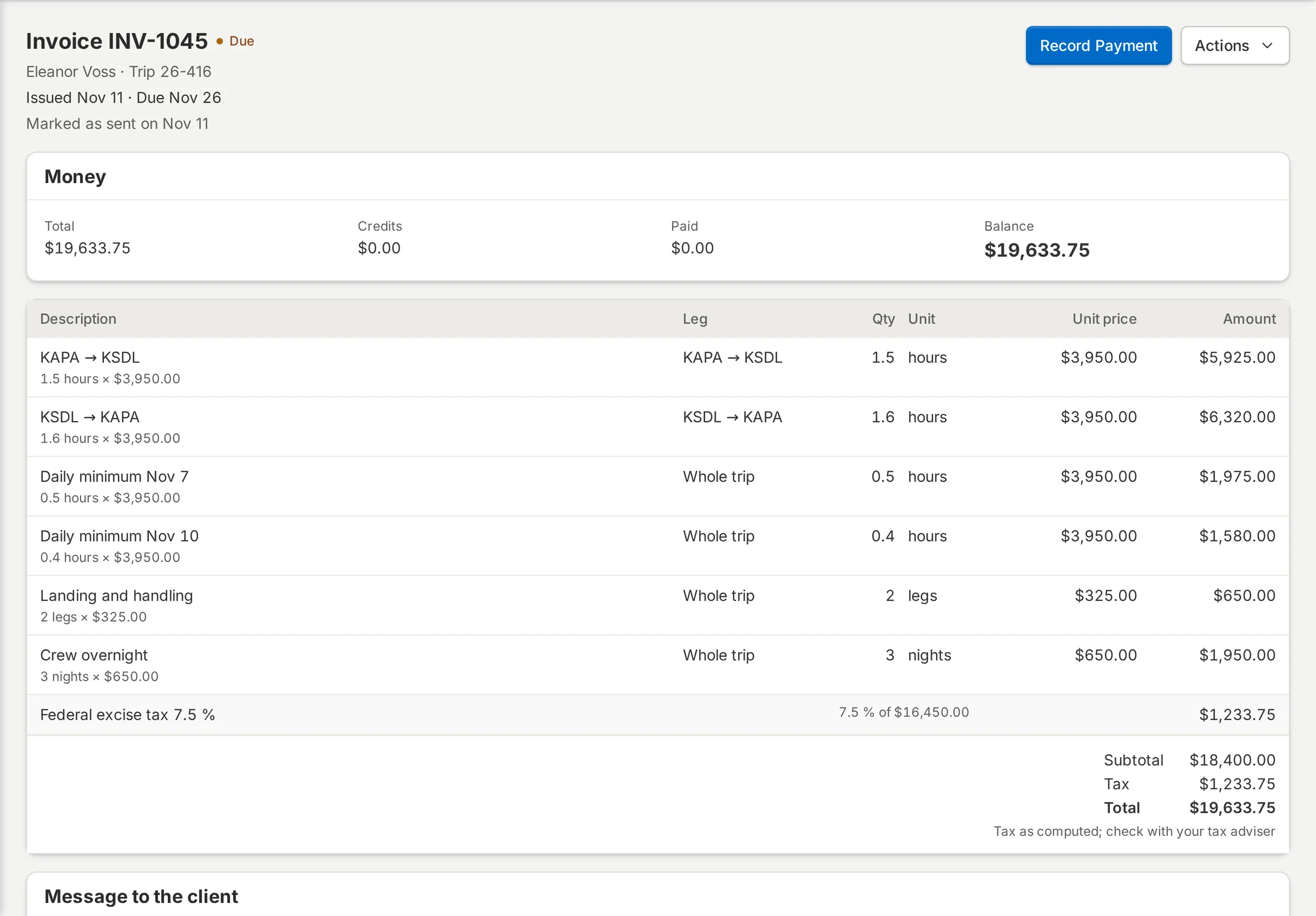
Issuing emails the invoice. The Billing email on the client's record gets a private link to it, on either plan. On the Charter plan, the client's portal contacts who can see prices and invoices are emailed too. If nobody would get it, the Delivery card says the invoice wasn't emailed: send it yourself with Download PDF or Copy Link, then choose Mark as Sent in Actions. With portal billing contacts, that menu item reads Send and emails them again.
Record a payment
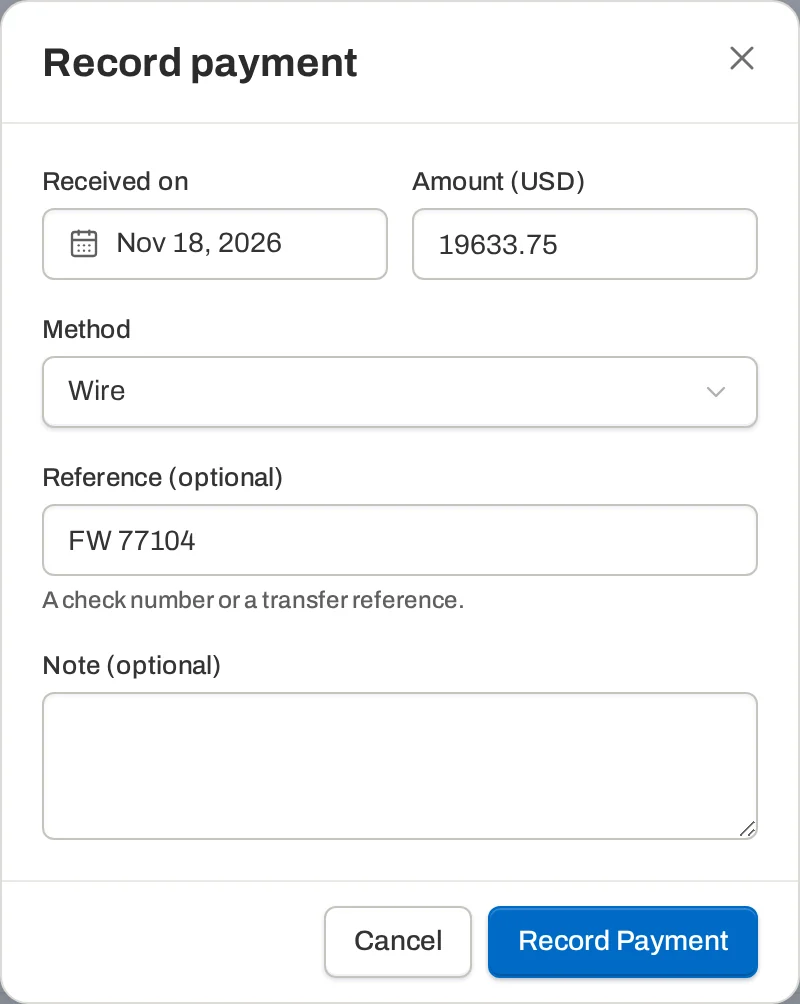
- Open the invoice and click Record Payment.
- Set Received on, the Amount and the Method: ACH, Wire, Check, Card, Cash or Other.
- Add a Reference, such as the check number or transfer reference, never a card number.
- Click Record Payment.
Part payments are fine. A payment recorded by mistake can be voided from its row on the Money card, with a reason; one that came from QuickBooks is changed there instead. Recording payments and refunds still works if your subscription has lapsed.
Invoice statuses
| Status | What it means |
|---|---|
| Draft | Not issued. No number yet. |
| Due | Issued, unpaid, before its due date. |
| Part paid | Some of it is paid, and it isn't past due yet. |
| Overdue | Past its due date with a balance, with the days late. |
| Paid | Paid in full. |
| Credited | Credit notes brought the balance to nothing. |
| Refund due | Payments and credits come to more than the total. Record Refund settles it. |
| Void | Canceled. Its number stays, marked void. |
Void an issued invoice with nothing paid or credited from Actions, Void, giving a reason. Its trip and receipts can then be billed again. An invoice with payments or credits needs a credit note instead.
A trip completes once every leg is logged, no receipt is waiting, and any invoice it has is issued and paid, or credited to nothing.
The Invoices list
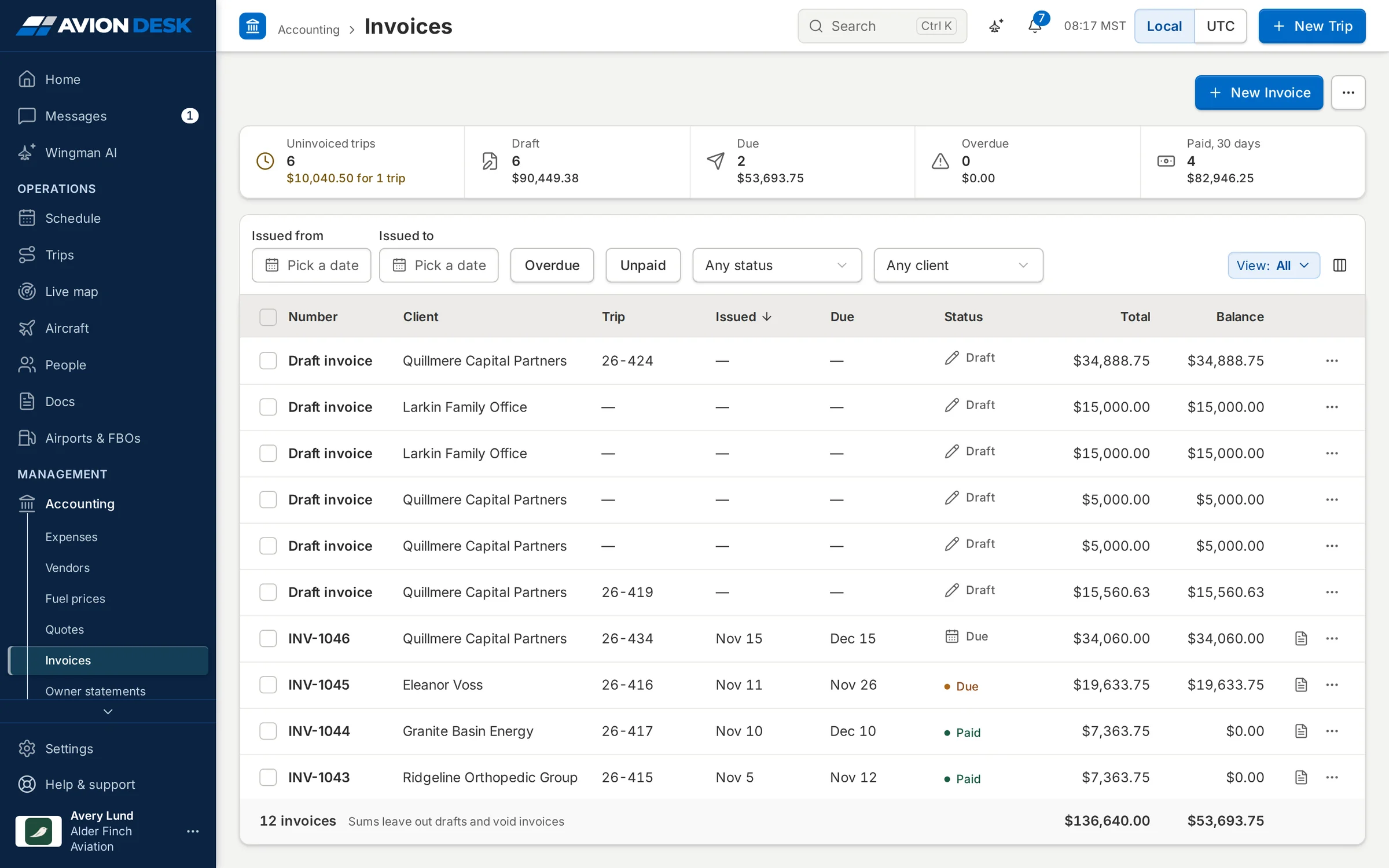
The strip shows Uninvoiced trips, Draft, Due, Overdue and Paid, 30 days. Due holds issued invoices still owed and not yet past their due date, part paid ones included. Uninvoiced trips adds up each trip's accepted quote. When none of them has one, it reads No amount yet; when only some do, it gives their amount and how many trips that covers, like $18,400.00 for 2 trips. Overdue and Unpaid filter in one click. The footer totals what was invoiced, paid, outstanding and overdue, leaving out drafts and void invoices. With QuickBooks connected, a mark beside each status says whether it reached QuickBooks.
Credit notesCorrecting an issued invoice.
ConnectionsSending invoices to QuickBooks.
Can’t find what you need? Email [email protected] and a person will answer.