

Flying
Flight plans, weather and eAPIS
Each leg shows the weather at both ends, reminds you until its flight plan is filed, and walks the PIC through eAPIS on a border crossing.
Weather on each leg
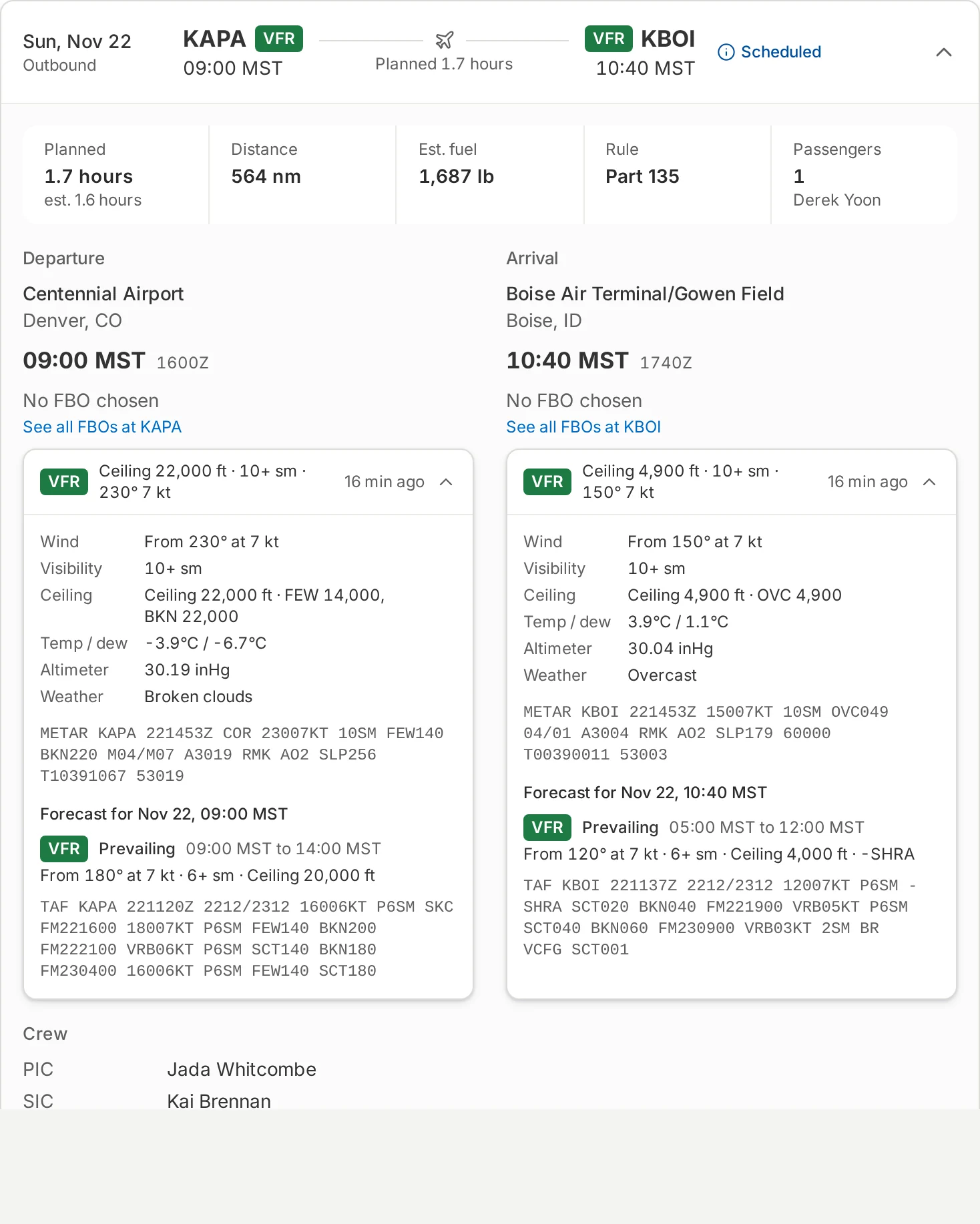
On a trip's Overview, each upcoming leg shows a VFR, MVFR, IFR or LIFR tag next to each airport, from the latest report. Open a leg to see a weather box under Departure and Arrival: the current report, then the forecast. Click a box for the full report: Wind, Visibility, Ceiling, Temp / dew and Altimeter, and the raw text.
An airport with no weather station says No weather reported here. If the weather service is down, the box says so; try again later.
Keep track of the flight plan
Each leg has a Flight plan filed item on the trip's Services tab, with the other things to arrange. Set it to Done once you've filed. Until then it shows as open in the trip's Pre-flight list and in the Release tab's To-dos. It never holds up the release.
Don't track flight plans this way? An Admin can turn the reminder off under Settings, Trips & duty, Leg reminders.
eAPIS for border crossings
A leg that crosses the US border gets a Customs (eAPIS) card on the trip's Overview. It names the leg, whether it's an arrival or departure filing, and when it's due. Filing is the PIC's legal duty, and the app sends nothing to CBP: you file in your own CBP eAPIS account and record it here.
| Status | Means |
|---|---|
| Missing details | Something CBP asks for isn't on file, like a passport or the aircraft's details. Each one links to where it's added. |
| Ready to file | Everything is on file. Open the filing sheet and file. |
| Filed | The confirmation is recorded. |
| Needs amending | The leg changed after filing. Amend in CBP eAPIS, then type the new confirmation and click Record Amendment. |
| Canceled | The filing was canceled. |
- On the leg's card, click Open Filing Sheet. It lists every value CBP's site asks for, crew and passengers included, each with a copy button.
- File in CBP eAPIS.
- Type CBP's confirmation under Filed in CBP eAPIS? Confirmation and click Mark Filed.
Admins, Schedulers and the leg's PIC or SIC can do this. A crossing leg with no confirmation shows as open in Pre-flight until it's recorded.
Weather and risk
Several starter risk questions ask about the forecast at the destination and along the way. Answer them after checking the weather boxes.
Can’t find what you need? Email [email protected] and a person will answer.